It knows your car's usual trips. It asks about the odd one.
Vigil watches for vehicle theft and hijacking through the tracker your car already has. It learns your usual trips, asks you when one looks wrong, and calls the emergency contacts you choose when it believes something is.
Now in early access, running with early users.
Is this you?
CAR-A left home at 22:14 on a road it doesn't usually take at this hour.
- Nothing is escalated.The trip is kept as an ordinary one, so the next late trip like it is less unusual.
- Your emergency contacts are called at once.An automated call says which vehicle, where it is and why Vigil is concerned.
- You and they decide what happens next,such as calling the police or your tracker's recovery line.
- The question stays openwhile the trip goes on.
- Still unusual, still no answer?Vigil calls your emergency contacts with the reasons, and you are told.
An illustration with made-up data. Try answering.
- No new hardware
- It doesn't track people
- It doesn't replace your tracker's recovery
How Vigil works
It reads a vehicle tracker's live feed, so there is nothing to fit. Most trips never get a question.
- 1
It learns the vehicle
When you connect, Vigil reads up to 90 days of each vehicle's history from the tracker: where it usually goes, when, and where it is usually parked. It keeps learning from every trip.
- 2
It asks when a trip looks wrong
If a trip doesn't fit, Vigil asks the owner or driver in the app whether everything is fine.
- 3
It escalates when it believes something is wrong
If the answers or the trip itself point to a theft or a hijacking, Vigil makes an automated call to the emergency contacts you chose, saying which vehicle, where it is and why, and the owner is told.
- 4
It tells you when the tracker isn't well
If the tracking unit stops reporting properly, Vigil says so, and says what it can't watch until it is fixed.
What Vigil looks at
Each vehicle is judged against its own history, not an average driver. No single sign decides. Vigil weighs them together, and the more of them point the same way, the sooner it acts.
Route and hour
A road this vehicle doesn't usually take, or a usual road at an unusual hour.
Stops and parking
An unfamiliar stop, or a night parked somewhere the vehicle has never stayed.
Moving with the ignition off
The vehicle moves while the engine is off, as it does when it is towed or loaded.
Power cut
The car's power to the tracking unit is cut, as happens when someone disconnects it.
The unit going quiet
The tracking unit stops reporting while it should be, and stays quiet.
Is your phone with the car?
With the app, and only while a trip is in doubt, Vigil checks whether the driver's phone is travelling with the car. A phone with the car counts against a theft; a car moving while every linked phone is elsewhere counts towards one.
Where a car is, and when, changes the risk
The same late trip counts for more in some places and at some hours. For each of South Africa's 1,167 police-station areas, Vigil turns SAPS figures into the rate of carjacking and of vehicle theft per car-owning household, against the national rate, with the hours of the day on top. It is updated every quarter when SAPS publishes new figures. The map shows the figures Vigil uses now.
Loading the map…
Recorded crime from October 2025 to September 2026. Figures: SAPS. Boundaries: Stats SA.
A high figure doesn't make an area a bad place to live, and a low one doesn't make it safe: in every area, most vehicles are never touched. Vigil uses the figure to judge how much an unusual trip or stop should count. City centres, harbours and towns on long-distance routes or near game reserves are hatched, because far more cars pass through them than are kept there, so a rate per household overstates them. Where few households own a car, the figure rests on little and is pulled towards the average.
For one car, a family's cars, or a fleet
The same watch, whoever owns the vehicles. What changes is who gets asked and who sees what.
| Car owners | Households | Fleets | |
|---|---|---|---|
| Who gets asked | You. | Whoever is driving, or the owner, so a late trip by a family member doesn't become an alarm. | The driver. Managers see the question and the answer. |
| Who sees the vehicles | You. | Every car in the household, in one place, for the owner and admins. | Fleet managers: every vehicle, its trips, the questions asked and anything that needs a look. |
| Phone check | Your phone, with the app. | Each member's phone that has the app. A member without it is simply not counted. | Drivers' work phones. Managers never see where a phone is. |
| If something is wrong | An automated call to the emergency contacts you choose, and you are told. | ||
A dashboard now. Apps on the way.
A web dashboard for households and fleet managers. Apps for iPhone and Android, for owners and drivers, are in development.
- Vehicles and trips: where each one is and where it has been.
- Questions asked: what Vigil asked, and the answer.
- Needs a look: anything unusual, including a tracker that has stopped reporting properly.
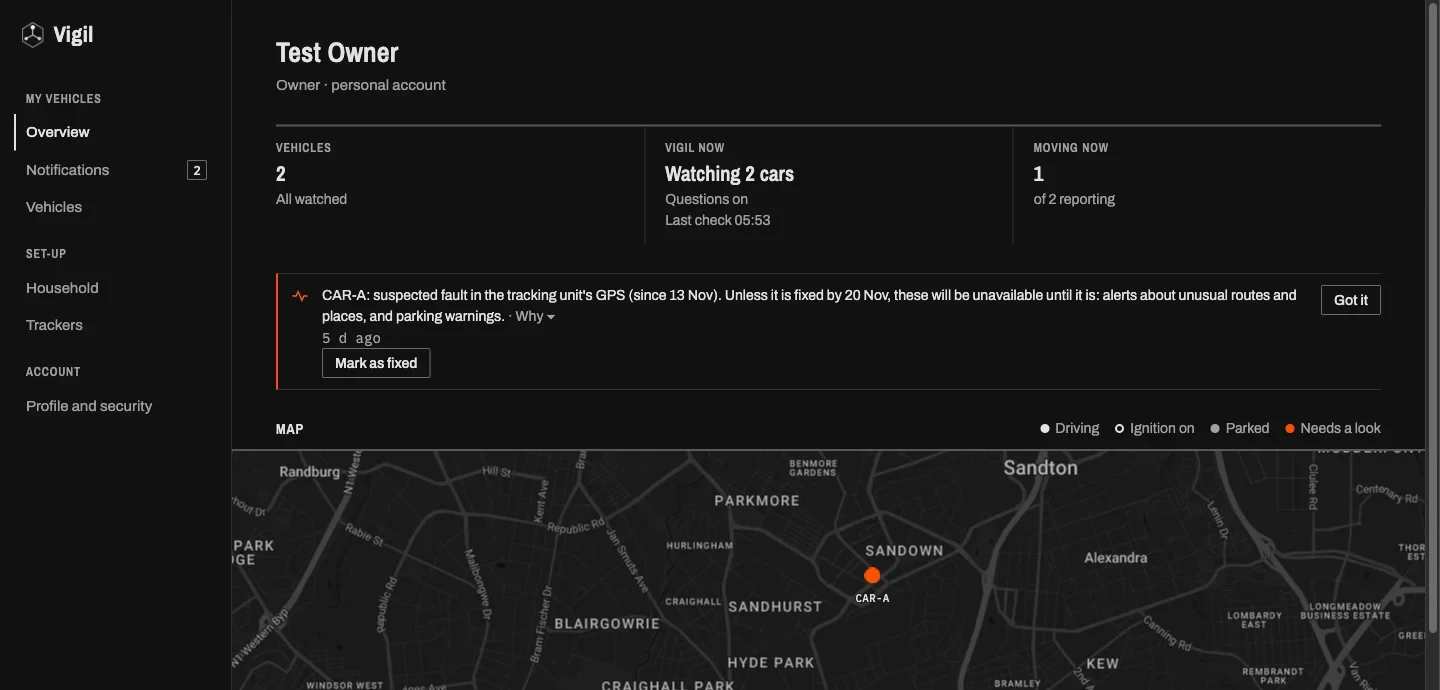
- Vehicles
- 2
- All watched
- Vigil now
- Watching 2 cars
- Moving now
- 1
- of 2 reporting
CAR-A: suspected fault in the tracking unit's GPS (since 13 Nov). Unless it is fixed by 20 Nov, these will be unavailable until it is: alerts about unusual routes and places, and parking warnings.
What Vigil doesn't do
It adds an earlier warning to what you already have. It doesn't take anything over.
- It doesn't need new hardware.
- It works through the tracker the vehicle already has. Nothing is fitted.
- It doesn't track people.
- Vigil watches the vehicle. The app shares where your phone is only while a trip is in doubt, the location is kept for 24 hours, and nobody is shown it.
- It doesn't replace your tracker's recovery.
- Your tracker's own recovery service carries on as it does today.
- It doesn't act on the vehicle.
- Vigil never stops a car or sends anyone out. It tells people: you, your drivers and your emergency contacts decide what happens next.
Questions
Do I need to fit anything to my car?
No. Vigil works through a vehicle tracker's live feed, using the tracker the car already has.
Does Vigil replace my tracking company's recovery?
No. Your tracker's own recovery service stays as it is. Vigil adds an earlier question and, when it believes something is wrong, a call to your emergency contacts.
What happens when Vigil escalates?
Vigil makes an automated phone call to the emergency contacts you chose: which vehicle, where it is and why Vigil is concerned. The owner is told too. You and your contacts decide what to do next, such as calling the police or your tracker's recovery line. You choose your emergency contacts in your account and can change them at any time.
Will I get questions about every trip?
No. Vigil asks only when a trip doesn't fit what it has learnt about the vehicle. Most trips never get a question.
What if my tracker stops working properly?
Vigil tells you, and says which parts of the watch are unavailable until the tracking unit is fixed.
Which trackers does Vigil work with?
Vigil starts with one South African tracker provider and is adding more. Tell us which tracker your vehicles have when you ask for early access. You connect your tracker account in Vigil; your tracker login details are checked, encrypted and never shown again.
Does Vigil use my phone's location?
Only with the app, and only while Vigil is unsure about a trip in a vehicle you are linked to. Then the app sends where the phone is, so Vigil can tell whether it is travelling with the car. Outside those checks the app records nothing. The locations are kept for 24 hours and are shown to nobody, including fleet managers. See the privacy notice.
How long does Vigil take to learn a vehicle?
When you connect a tracker, Vigil reads up to 90 days of the vehicle's history from it, so it starts with the vehicle's usual trips and places, and keeps learning from there. The dashboard shows whether each vehicle is still learning or being watched.
Is there an app?
Apps for iPhone and Android are in development. Early users use the web dashboard today.
Vigil is running with early users.
Tell us about your vehicles and the tracker they have, and we'll be in touch about early access.